


Stocks: Realtime Quotes Charts
4.84.31K Reviews
App Specs
- Version
- 13.5
- Updated On
- License
- Free
- Downloads
- 1,000,000+
- Developer
- StockSpy Apps Inc.
- Categories
- Finance
- Platform
- Android
Screenshots
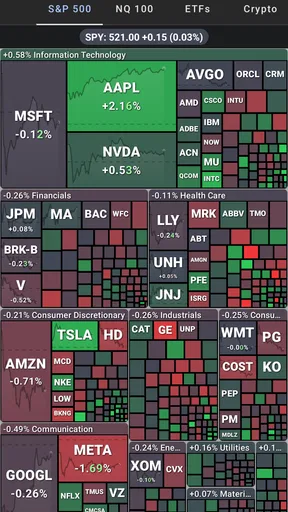

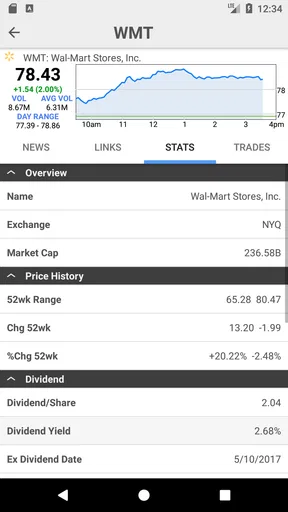
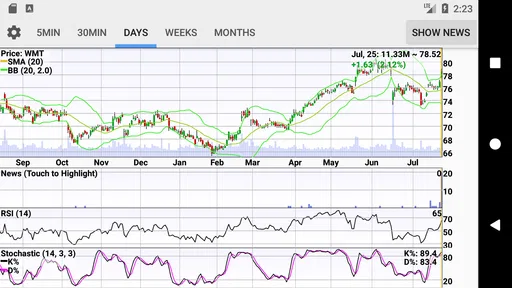
 Analysis by AppCompare
When I want to check a company without turning the moment into a full research session, I value a tool that brings quotes, charts, headlines, and a portfolio view together. Stocks: Realtime Quotes Charts is built around that kind of quick market check. I’d treat it as a monitoring companion: useful for organizing what I want to follow, then deciding whether a deeper look is worth my time.
A practical routine for the daily market check
My most useful approach is to begin with a short watchlist rather than trying to follow everything at once. I would group companies by the reason I care about them—perhaps holdings I already own in one list and businesses I am researching in another. That makes a quick scan more meaningful: a move in a current holding deserves a different response from a move in a company I am only considering.
From there, I’d check a quote, look at the chart across more than one time frame, and then read the related news before drawing a conclusion. A sudden price change can look dramatic when viewed in isolation; seeing its broader chart context and a headline can help me decide whether it is part of a longer pattern or a fresh event. That sequence is more useful than reacting to a number alone.
For a realistic everyday example, imagine I have a few minutes before work and want to check a company I own. I can use the watchlist to find it, glance at its current quote, compare the chart with the period I normally monitor, and scan the news. If nothing calls for closer attention, I can close the app and get on with my day. If something stands out, I can note the question I need to research later rather than treating a quick market check as a complete investment decision.
Settings and habits that make alerts useful
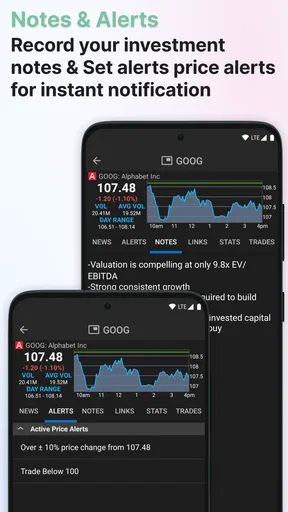
Alerts work best when they answer a specific question. Before setting one, I’d decide what I would actually do if it arrived: review a position, read a news item, or simply check whether a price has crossed a level I care about. If an alert would not change my next step, it may add noise instead of helping. A small, deliberate set of alerts is easier to manage than notifications for every movement.
I’d also separate monitoring from action. A price alert can tell me that it is time to pay attention; it does not tell me whether to buy or sell. That distinction matters with any market tracker, particularly when a rapid move creates pressure to act. I find it more sensible to use the app to surface a change, then assess the chart and news in context before making a decision elsewhere.
It is worth testing a repeatable routine for a few days: check the same watchlists at a consistent time, use the same chart periods for comparisons, and adjust alerts only when they are no longer useful. This gives me a clearer sense of what deserves attention and helps prevent constant app-checking. The benefit is not just convenience; it is a calmer way to handle a stream of market information.
Worth Reading Before You Choose

EA SPORTS FC Mobile 26 Is a Bigger Football Game, but It Takes Time

Flipboard Shows What News Apps Must Do Beyond the Feed

Switching to Android Auto Means Rethinking Your Driving Routine

Google Calendar Makes a Crowded Week Easier to Manage

Ludo King Makes the Most of the Minutes Between Plans

Baby Panda World Brings Quick Play to Modern Phones, but Its Game Library Feels Busy
Who benefits most—and where it may not fit
This finance app is a good fit for people who want a convenient overview of selected stocks and appreciate having charts and market news close to their watchlists. It can also suit someone learning to follow companies, because checking a small group repeatedly makes it easier to notice how prices and headlines relate over time. StockSpy Apps Inc. develops it, and the app has a 4.8 average from around 26,000 ratings, with more than a million installs.
I would be less likely to rely on it as my only tool if I needed a complete research workspace, detailed company fundamentals, or a place to place and manage trades. A market-tracking app and a brokerage app serve different jobs. I’d use this one to watch and organize information, then turn to a suitable research source or trading platform when I need functions beyond monitoring. That separation also helps keep a quick quote check from being mistaken for a full evaluation.
Compared with checking a broker’s app, a dedicated tracker can make it easier to keep attention on a chosen set of companies rather than on account activity. Compared with a broad financial news app, a stock-focused tool can make chart and watchlist checks feel more direct. The trade-off is that no single view replaces careful research: headlines can be brief, and charts show price behavior, not the reasons a business may be attractive or risky.
First Impressions: Sleek and User-Friendly
From the moment I downloaded Stocks: Realtime Quotes Charts on my phone, I was impressed by its sleek design. The interface is intuitive, with everything neatly organized for easy navigation. Even if you're a newbie to stock trading, the app makes you feel right at home. It's clear that the developers put a lot of thought into making it user-friendly.
Diving into Features: More Than Just Quotes
The app isn’t just about getting real-time quotes; it’s packed with features that can cater to both beginners and seasoned traders. Let’s dig a little deeper into what it offers:
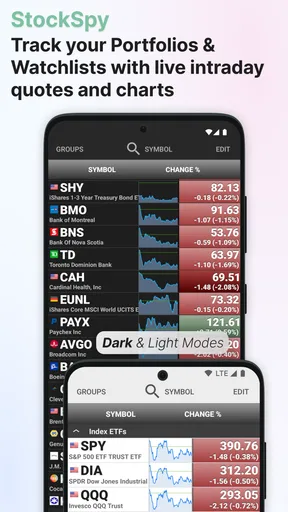
- Realtime Updates: As the name suggests, this app provides real-time stock quotes. No more delays or outdated information, which is crucial when every second counts in trading.
- Interactive Charts: The interactive charts are a highlight. They allow you to zoom in and out, providing a detailed view of stock performance over different time frames. It’s perfect for analyzing trends and making informed decisions.
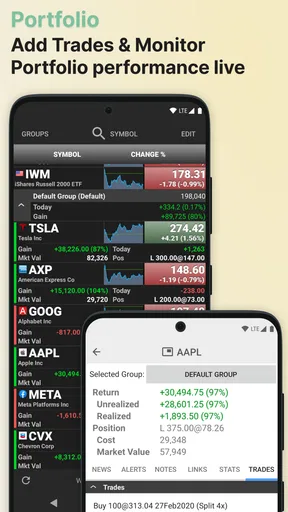
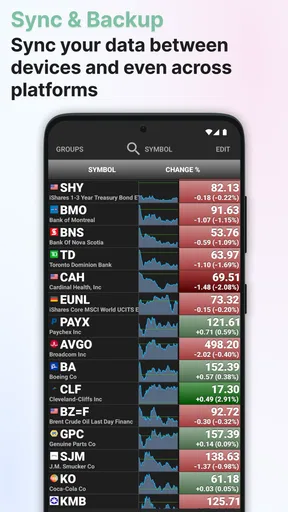
- Customizable Watchlists: You can create and manage multiple watchlists, which is perfect for keeping an eye on different sectors or specific stocks. I found this feature particularly handy for tracking my favorite tech stocks.
- News and Insights: The app integrates news updates and insights from market experts. It’s like having a mini stock market news channel right in your pocket!
Performance: Fast and Reliable
Performance-wise, the app runs smoothly without any hiccups. I’ve used it during peak trading hours, and it handled the data stream like a champ. The updates are instantaneous, ensuring you never miss a beat. It’s also light on data usage, so no worries about burning through your data plan!
Customization and Alerts: Tailored Just for You
One of the standout features is the level of customization available. You can set up alerts for price changes, volume spikes, or news updates. This means you can stay informed about your investments without being glued to the screen constantly. The ability to tailor these alerts to your preferences makes the app incredibly versatile.
Security: Your Data, Safeguarded
In an era where data security is paramount, Stocks: Realtime Quotes Charts takes it seriously. The app is equipped with robust security features to protect your data. It requires authentication and encryption, giving you peace of mind that your financial information is safe.
Overall, I must say, this app has exceeded my expectations. Whether you're a casual investor or a hardcore trader, it offers something for everyone. It’s like having a personal stock market assistant in your pocket, always ready to give you the latest updates and insights.
The app is free to download, with optional in-app purchases ranging from $0.99 to $11.99 per item. It is rated for Everyone, and version 13.3 requires Android 6.0 or later. It has been available since March 4, 2013, and its strong 4.8 average reflects a favorable response across about 4,300 written reviews. Those details make it approachable for casual use, though I’d still check which optional extras matter to me before paying for anything.
Using it as a tracker, not a trading shortcut
One useful habit is to treat each watchlist as a small research queue. I can place a company there because I own it, because I am comparing it with a competitor, or because a news story made me curious. When I revisit the list, I have a practical reason for checking each name instead of scrolling through a long collection with no clear purpose. The app is most helpful when the list reflects decisions I may actually need to make.
For comparisons, I’d open the same chart periods for two companies rather than judging one from a close-up and the other from a broad view. This does not establish which business is stronger, but it prevents a misleading visual comparison caused by looking at different stretches of price history. I would then use the news view to identify events worth investigating elsewhere. It is a simple workflow, but it makes a phone-based check more disciplined.
There is also a useful trade-off in keeping a tracker separate from a brokerage. A tracker can help me observe a company without immediately seeing my account balance or feeling pushed to transact. On the other hand, I may need to switch apps when I want to confirm a holding or place an order. For anyone who values a single all-in-one account experience, that extra step may feel inconvenient; for someone who wants to separate research from execution, it can be a benefit.
What to expect from real-time information
The word “real-time” can sound like a promise of perfect decision-making, but quote timing and market context are not the same thing. I would use the displayed information as a prompt to investigate, not as a guarantee that I can act at an exact price. Market data can move quickly, and a chart or alert is only one part of understanding a situation. If a trade depends on precise execution, the relevant broker and its order details matter more than a tracker’s convenient overview.
Likewise, chart controls are valuable for examining price behavior, but they cannot explain a company’s full financial condition. I would not infer long-term quality from a rising line or treat a sharp dip as a complete argument to buy. The strongest use of the charts is comparative and observational: check whether the move is unusual for the periods I follow, then seek the underlying context before acting.
News can also be a starting point rather than a finished analysis. A headline may help me understand why a stock is attracting attention, but I would read beyond the headline when the issue affects a real decision. That is especially important when several companies in a watchlist respond differently to the same market story. The app can bring these signals together conveniently; judgment still belongs to the person using it.
Choosing a setup that stays manageable
I would begin with a few purposeful lists and only add alerts tied to clear questions. If the app starts interrupting me without changing what I do, I would remove or revise those alerts rather than letting notifications dictate my attention. I’d also keep a note of what I want to learn about a company, so a brief quote check has a useful next step. These habits make the app feel less like a stream of numbers and more like a light personal tracking system.
For a newcomer, the easiest way to get value is to follow familiar companies and compare their charts over consistent periods while reading related news. That provides practice in interpreting movement without implying that the app teaches investing or removes risk. More experienced users may appreciate quick access to several watchlists, but anyone who needs screening tools, extensive financial statements, or trade execution should pair it with a specialized service. The right choice depends on whether the main task is watching, researching, or trading.
My verdict after putting the workflow in perspective
Stocks: Realtime Quotes Charts makes the most sense when I want a focused place to monitor selected companies and connect a price move with a chart and news. Its free entry point, watchlists, and alerts make it approachable, while optional purchases mean it is sensible to review any paid extras before committing. It is aimed at everyone by age rating, but beginners should remember that easy access to market information is not the same as investment guidance.
I would recommend it to a friend who checks stocks regularly, wants a more organized alternative to searching company names one by one, and is comfortable using another service for deeper research or orders. I would steer away from relying on it alone if the goal is comprehensive analysis or active trading execution. Used with a clear routine, it can make everyday monitoring more orderly; used as a signal to react to every fluctuation, it can just as easily encourage unnecessary checking.
If you’re looking to keep your finger on the pulse of the stock market with ease and efficiency, I highly recommend giving it a try. It’s available for both Android and iOS. Happy trading! 🚀
Pros
- User-friendly interface for novices.
- Real-time quotes refresh quickly.
- Comprehensive charting tools available.
- Customizable alerts for price changes.
- Supports multiple stock exchanges.
Cons
- Limited free features without subscription.
- Occasional lag on high-traffic days.
- Ads can be intrusive at times.
- Requires stable internet for updates.
- Lacks in-depth news analysis.
FAQs for Stocks: Realtime Quotes Charts
What features does Stocks: Realtime Quotes Charts offer?
Stocks: Realtime Quotes Charts provides users with up-to-the-minute stock quotes, detailed charts, and financial news. It also offers customizable watchlists, alerts for price changes, and a variety of charting tools to analyze stock trends. The app is designed to cater to both novice investors and experienced traders looking for comprehensive market insights.
Is Stocks: Realtime Quotes Charts free to use?
The app offers a free version with essential features, but it also includes in-app purchases and subscription options for advanced functionalities. These premium features may include enhanced charting tools, ad-free experience, and access to exclusive market analysis. Users can choose based on their investment needs and budget.
How accurate is the data provided by Stocks: Realtime Quotes Charts?
The app sources its data from reputable financial services to ensure accuracy and reliability. It updates stock quotes in real-time, allowing users to make informed decisions swiftly. However, like any financial tool, it's advisable to cross-check with other reliable sources before making investment decisions to ensure the highest accuracy.
Does Stocks: Realtime Quotes Charts support global stock markets?
Yes, the app covers a wide range of global stock markets, enabling users to track international stocks alongside domestic ones. This feature is particularly beneficial for investors looking to diversify their portfolio by investing in foreign markets. Users can easily switch between markets and customize their watchlists accordingly.
Is it easy to use Stocks: Realtime Quotes Charts for beginners?
The app is designed with an intuitive interface that caters to both beginners and seasoned investors. It includes tutorials and guides to help new users navigate through the features effortlessly. The user-friendly design ensures that even those new to the stock market can easily track their investments and understand market trends.


